Find your network.
Aim with confidence.
Know where to point before you connect. MeshFinder for AREDN® puts fixed mesh sites, bearings, and antenna aiming guidance in your pocket.
Building your group’s network? Open the web editor
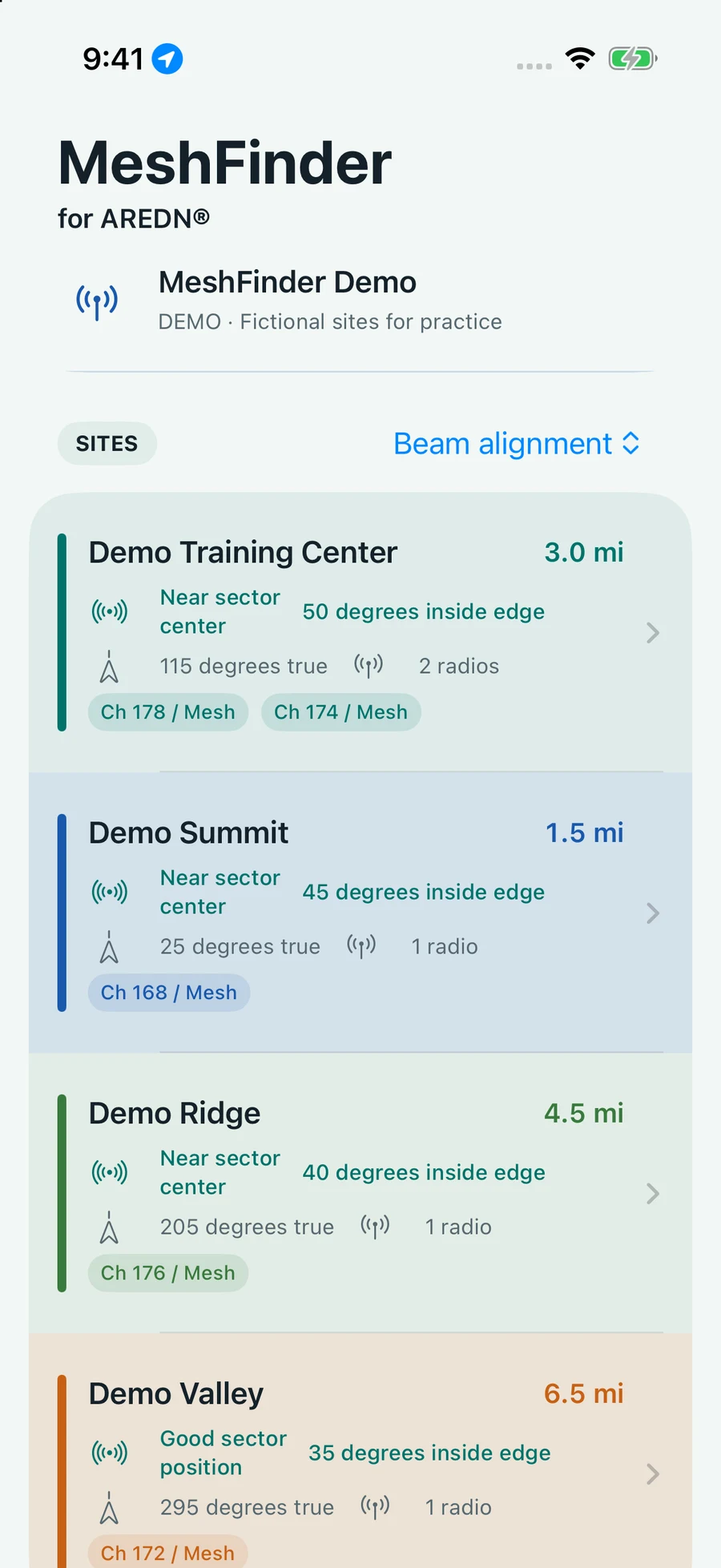
Less guesswork.
More time in the field.
A clearer path
to your next setup.
Bring your network’s fixed-site data along. Use your phone’s location and sensors to work out where to aim.
- 01
Choose your network
Start with a fictional demo, then enter your group’s join code or scan its QR invitation. Each network has its own sites, name, and optional logo.
- 02
Find the right site
Compare distance, bearing, and nominal antenna beam alignment. Sort by distance, site name, or beam alignment to make your selection.
- 03
Aim in the field
Get heading and up/down guidance, alongside radio channel, width, and SSID. Your joined network’s data stays available offline.
Aiming guidance is approximate and depends on sensor accuracy. MeshFinder does not predict RF coverage or guarantee a connection. Vertical guidance requires usable phone altitude.
Your sites.
Your group. Your network.
Create a network in the web editor, add up to 30 sites with their radios and antennas, and share a join code or QR invitation with your operators.
Save drafts, publish when ready, and invite other managers by email. Published site data is public and unlisted; keep confidential information out of it.
Create or manage a network
A little direction goes a long way.
MeshFinder for AREDN® for iPhone. Coming soon on the App Store.